 lightlyn
Clean up
“Remove the people in the background.” “Take the cables off the desk.” “Clear the clutter on the counter.”
No layers, no brushes. Upload a photo, describe the change in a sentence, and keep going. Each edit builds on the last one, and you can return to any version.
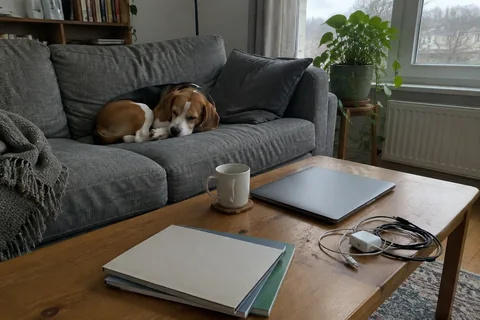
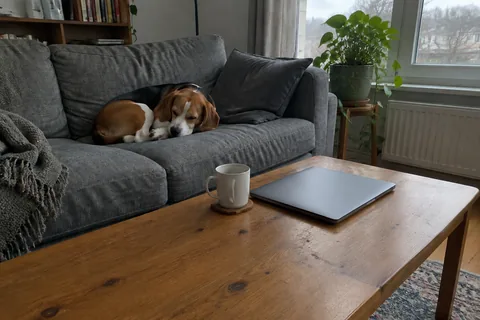

Real results from Lightlyn Images (GPT Image 2.5 Sunburst), not retouched. The sample photo was made for this demo.
“Remove the people in the background.” “Take the cables off the desk.” “Clear the clutter on the counter.”
“Make it golden hour.” “Turn day into night.” “Make it look like an overcast winter morning.”
“Make the sofa dark green velvet.” “Paint the wall terracotta.” “Change the car to matte black.”
“Put this on a beach at sunset.” Or use the background page for transparent and white backgrounds.
“Change the sign to say OPEN DAILY.” “Add the title Summer Market at the top.” Check the spelling in the result.
Use any picture as the starting point: “Turn it into a watercolor.” “Make it a vintage travel poster.” Or start from one of hundreds of templates in the studio.
Add a photo and, if you like, the first change. The studio opens with the photo attached and the request written out.
Pick a size up to 4K and send. Nothing is made, and no credits are used, until you do. Make up to 4 versions at once on a paid plan.
Ask for the next change, or pick any earlier version and take it in a new direction. Everything stays in your private library.
The editor uses GPT Image 2.5 Sunburst, the model made for precise edits. In the example above, removing the cables left the laptop, the mug and the dog as they were. Check the details that matter before you publish, and point out anything that drifted.
Ask for a version up to 3840 pixels on the long side. Fine detail is generated to match the original, which works well for illustrations, AI images and product shots; it is not a forensic restoration of evidence or archive photos.
Ordinary edits of your own photos, such as light, color, background and clean-up, are fine. Face swaps and images that make real people appear to do things they didn’t are not allowed. See our Acceptable Use Policy.
Each image costs 1–4 credits depending on resolution; failed generations are refunded. See current pricing.
No. You describe the change in your own words, in any language. If the result isn’t right, say what to fix in the next message.
Yes, that is the default: every edit asks the model to keep everything else unchanged, the studio sends your earlier result along with the request, and Sunburst is built for precise edits. See the Flare vs Sunburst tests for a side-by-side example. If something drifted, point it out and it is fixed from the last result.
Yes. Every result stays in the conversation and your library. Pick any one and continue from it.
Yes. Upload a photo or any picture as the starting point and describe what you want, from a small fix to a completely new style. You can add up to 8 reference images at once, for example a product and a style to follow.
It can make a new version at up to 4K. The added detail is generated to match, which is great for artwork, AI images and product shots, but not a forensic restoration.
New accounts get 30 free credits1 and 3 more with each daily check-in. An image costs 1–4 credits depending on resolution.
Only you. Uploads and results are kept in your private library and are not used to train models. See our Privacy Policy.
Add a photo, say what to change, and see the result in the studio.
Choose a photoGPT Image 2.5 is a model by OpenAI. Lightlyn is an independent product, not affiliated with or endorsed by OpenAI.